Engineer Program
Program upgrade skill di bidang engineering, dari dasar hingga mahir.
Spesial Program
Program khusus melalui platform mitra resmi dokter mekanik academy seperti Udemy, Prakerja, dan Kampus Merdeka.
Program upgrade skill di bidang engineering, dari dasar hingga mahir.
Program khusus melalui platform mitra resmi dokter mekanik academy seperti Udemy, Prakerja, dan Kampus Merdeka.
Sertifikasi BNSP
Pilih pelatihan dan sertifikasi Nasional BNSP di bidang engineering, rekayasa, manufaktur, dan subsetnya
Lihat Semua
Sertifikasi Internasional
Pilih pelatihan dan sertifikasi Internasional di bidang engineering, rekayasa, manufaktur, dan subsetnya
Lihat Semua
Temukan inspirasi dari hasil karya dan pengalaman para alumni dr. Mekanik Academy.

dr. Mekanik Academy tersedia di berbagai platform mitra resmi untuk memudahkan akses pelatihan Anda.

Jelajahi produk dan layanan lainnya dari ekosistem dr. Mekanik untuk solusi bisnis yang komprehensif.

Membantu kamu belajar, berkarya, dan membuat proyek engineering secara instan dan presisi!
 Oleh: Nur Cahyono Kusharianto
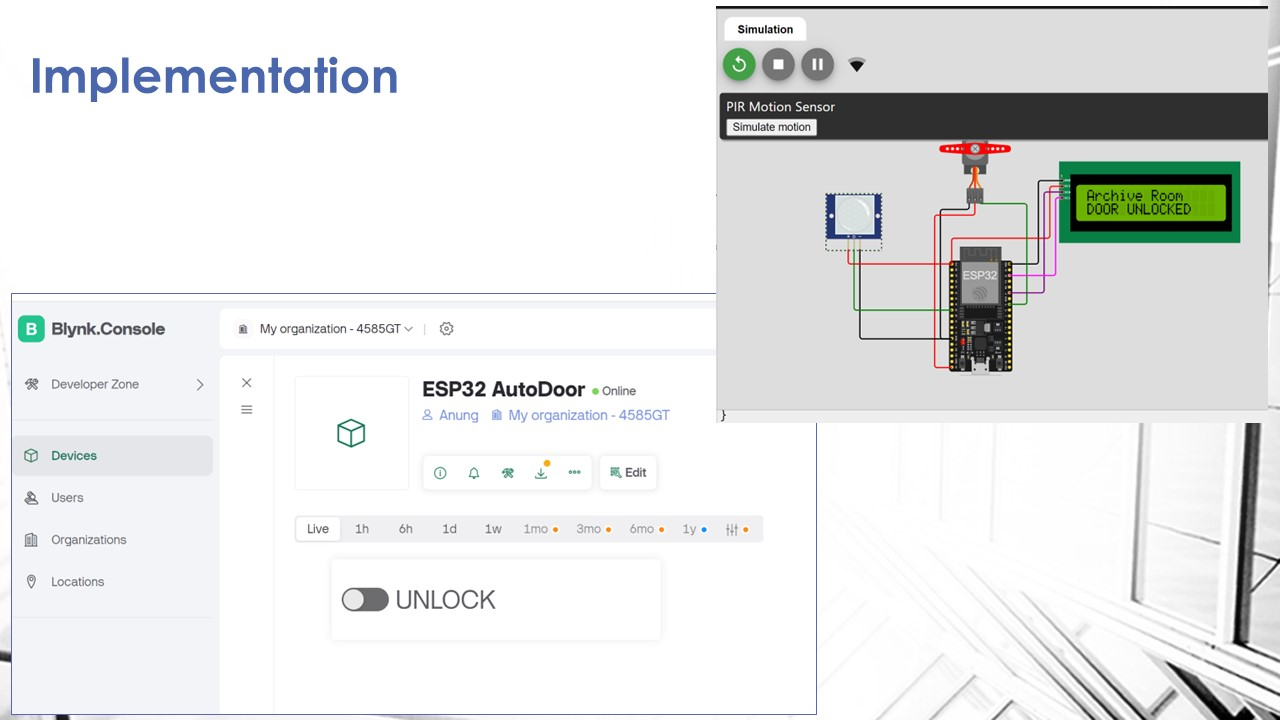
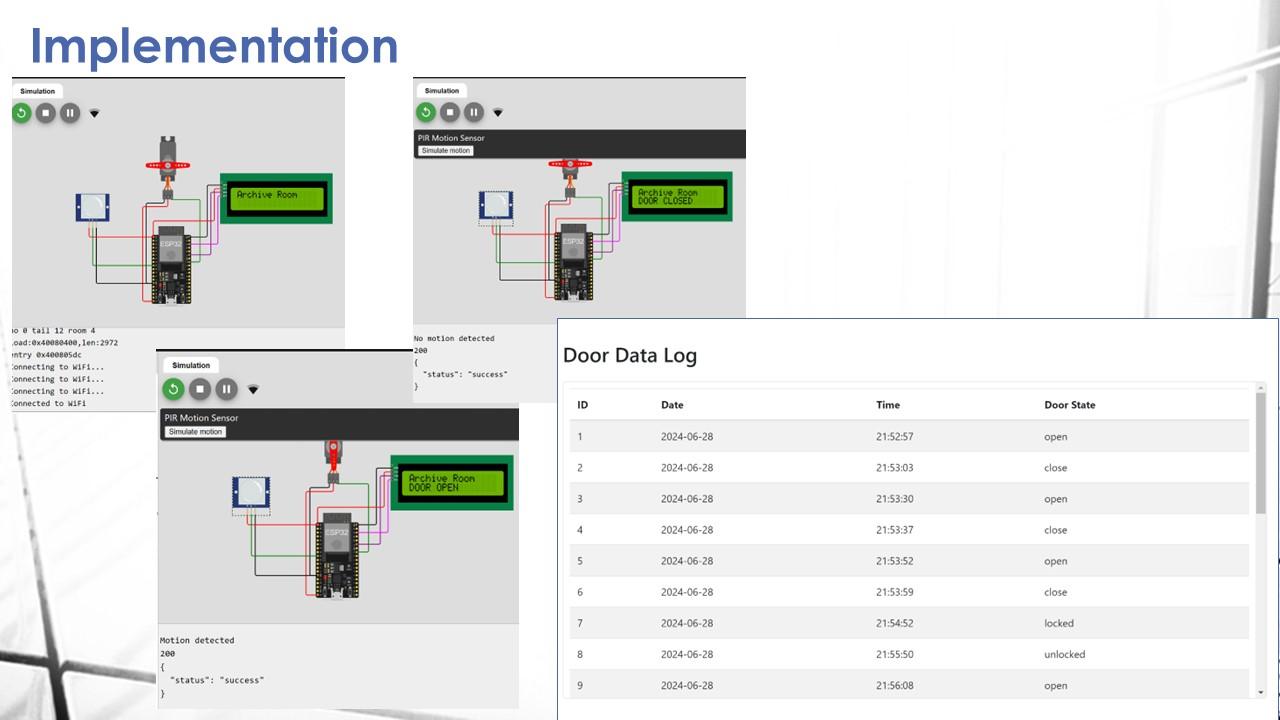
This project aims to create touchless automatic doors that can be monitored online to see how often the room is accessed. The resulting information can be used to determine several office policies related to physical facilities.
In a law office, there is an archive room that office employees often visit. Many essential documents, such as contracts, case files, legal precedents, and sensitive client information, are in the archive room. Sometimes, they leave the room carrying documents and need help opening and closing the door. So, the office decided that the latest generation of automatic doors would be installed in the room.
This project aims to answer this challenge by creating touchless automatic doors that can be monitored online to see how often the room is accessed. This automatic door system works in the following way:
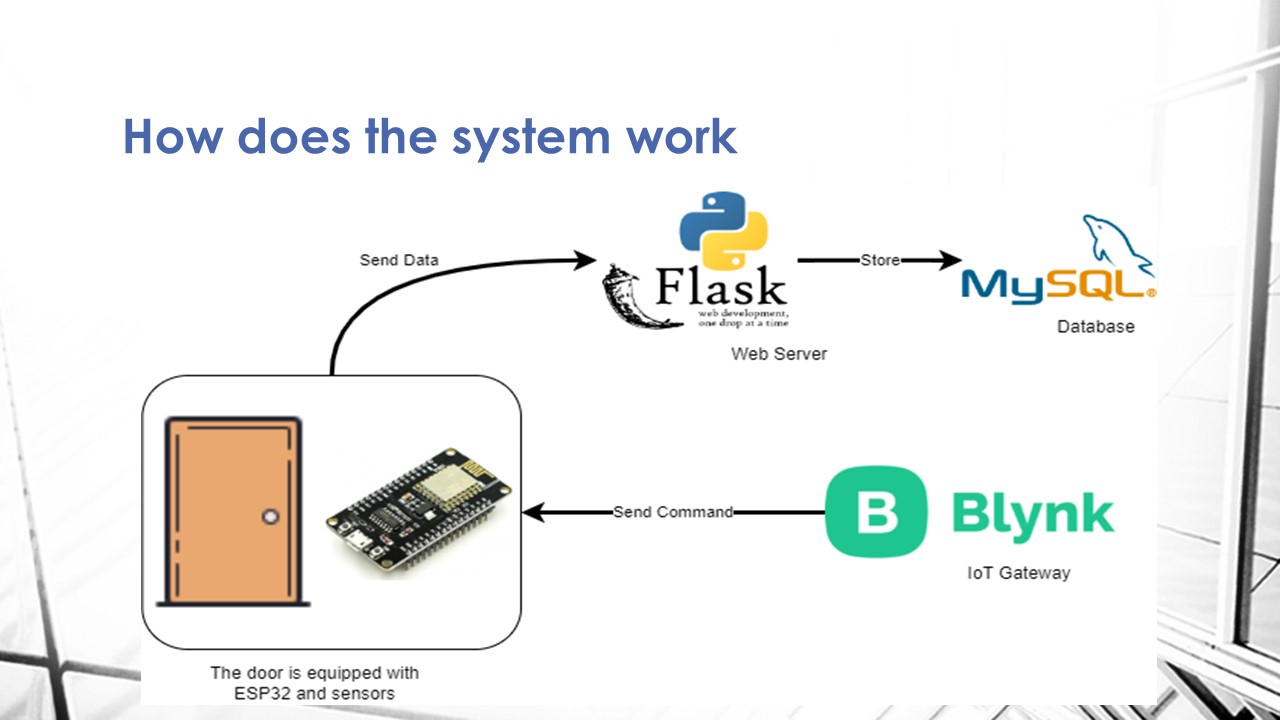
The door is equipped with a motion sensor (PIR sensor) and an ESP32, which is connected to the Internet, the WebServer API backend, and the MySQL database.
If someone approaches the door and is close enough, the door will open automatically, and a few seconds later, if the person has entered through the door, it will close automatically.
The system ensures real-time data transmission of the door's activity. Whenever the door is opened or closed, this information is instantly sent to the API web server in the cloud and stored in the database. (Thi resulting information can be used to determine several policies in the office related to physical facilities)
Users Can easily monitor the door's activity data on the website. By simply accessing the site via a web browser, they can view a recap of the data, which is directly posted from the database to index.html.
Another feature of the application is a door lock button that is created virtually using the Blynk IoT gateway. The virtual blynk button is held by the office leader. If the leader presses the "LOCK" button, the door will be locked and will not open even if someone approaches it. If the “UNLOCK” button is pressed, the door functions normally as before.
0 Orang Menyukai Karya Ini

Kantor Pusat:
Jalan Banda No.30 Kota Bandung, Jawa Barat
Kantor Operasional:
Jalan Sawangan Permai B17, Kota Depok, Jawa Barat
PT Rezeki Mekanik Indonesia
Copyright © 2026 Indonesia AI. All Rights Reserved.